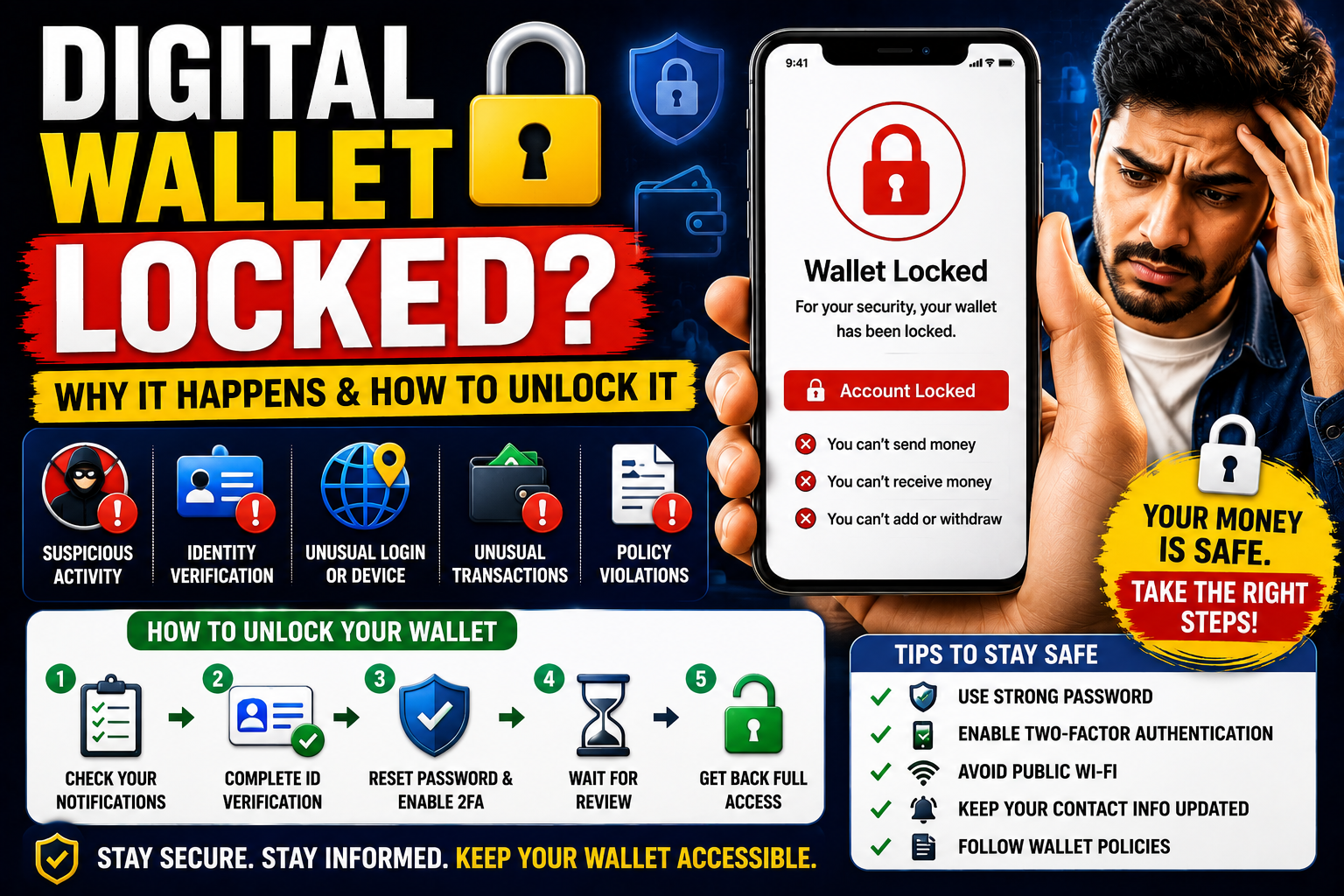
Learn why a Digital Wallet Locked notification appears, the most common reasons for wallet restrictions, how to unlock your account, and practical tips to prevent future access issues.
Table of Contents
Digital wallets have become an essential part of modern financial life. Whether you’re shopping online, paying bills, sending money to friends, receiving business payments, or managing digital assets, digital wallets offer speed, convenience, and security.
However, many users are caught off guard when they suddenly receive a notification that their Digital Wallet Locked. In an instant, they may lose the ability to make payments, transfer funds, receive money, or access their wallet balance.
A locked digital wallet can be stressful, especially if you depend on it for daily transactions or business operations. Fortunately, in most cases, a wallet lock is a temporary security measure rather than a permanent account closure.
Understanding why digital wallets become locked, how providers investigate suspicious activity, and the steps you can take to restore access can help you resolve the issue more quickly while protecting your financial information.
In this guide, we’ll explain the most common reasons for a Digital Wallet Locked notification, how to unlock your wallet safely, and best practices to avoid future account restrictions.
What Does “Digital Wallet Locked” Mean?
A Digital Wallet Locked status means the wallet provider has temporarily restricted access to your account or certain features.
Depending on the situation, you may be unable to:
- Send money
- Receive payments
- Make purchases
- Withdraw funds
- Link new payment methods
- Transfer money to your bank account
- Access wallet balances
The exact restrictions depend on the reason your wallet was locked.
To learn more about digital payment security, visit the Consumer Financial Protection Bureau (CFPB):
https://www.consumerfinance.gov
Why Do Digital Wallet Providers Lock Accounts?
Digital wallet providers process millions of financial transactions every day.
To protect users and comply with international financial regulations, providers continuously monitor accounts for unusual or potentially fraudulent activity.
Wallets may be temporarily locked to:
- Prevent fraud
- Stop unauthorized access
- Verify customer identity
- Comply with anti-money laundering regulations
- Investigate suspicious transactions
- Protect customer funds
Most providers use automated risk detection systems that can temporarily restrict accounts until additional verification is completed.
Common Reasons a Digital Wallet Gets Locked
Several situations may trigger account restrictions.
Suspicious Login Activity
Logging in from:
- A new country
- An unfamiliar device
- Multiple locations within a short period
- Public Wi-Fi
- VPN services
may trigger additional security measures.
The provider may temporarily lock your wallet until your identity is confirmed.
Too Many Incorrect Password Attempts
Repeated failed login attempts may cause your account to be locked automatically.
This helps prevent unauthorized users from guessing your password.
Unusual Transaction Activity
Digital wallet providers monitor transaction patterns.
Examples that may trigger review include:
- Large payments
- Rapid transfers
- Multiple transactions within minutes
- Unusual international payments
- Unexpected changes in spending behavior
These reviews are intended to protect both customers and the payment network.
Identity Verification Required
Many digital wallet providers must verify customer identities under financial regulations.
You may be asked to provide:
- Government-issued ID
- Passport
- Driver’s license
- Proof of address
- Selfie verification
- Business registration documents (for business accounts)
Until verification is complete, account access may remain limited.
Expired Identity Documents
If previously submitted identification has expired, the provider may request updated documents before restoring full access.
Policy Violations
Wallet providers prohibit certain activities, including:
- Fraudulent transactions
- Money laundering
- Unauthorized commercial use
- Prohibited products or services
- Intellectual property violations
Policy reviews may result in temporary or permanent restrictions depending on the severity of the issue.
Always review your provider’s official terms of service before using the platform.
How to Know Why Your Wallet Was Locked
Most digital wallet providers notify users through:
- In-app notifications
- Account dashboard
- Resolution Center
- Secure messaging
The notification usually explains:
- Why access was restricted
- What documents are required
- Which actions must be completed
- Estimated review timelines
Always access these notifications through the provider’s official website or mobile application.
How to Unlock a Digital Wallet
In many cases, restoring access is straightforward.
Step 1: Log Into Your Account
Use only the provider’s official website or app.
Avoid clicking links in unexpected emails or text messages claiming your wallet is locked, as these may be phishing attempts.
Step 2: Review the Account Notification
Read the provider’s explanation carefully.
Determine whether the issue involves:
- Identity verification
- Security review
- Missing documentation
- Transaction investigation
- Policy compliance
Understanding the reason helps you respond appropriately.
Step 3: Complete Identity Verification
If requested, upload the required documents clearly and accurately.
Common verification documents include:
- Passport
- National ID card
- Driver’s license
- Utility bill
- Bank statement
- Business registration documents
Ensure all information matches your account details.
Step 4: Reset Your Password
If the lock resulted from failed login attempts or suspected unauthorized access:
- Create a strong password.
- Avoid reusing passwords from other websites.
- Update security questions where applicable.
Step 5: Enable Two-Factor Authentication
Adding two-factor authentication (2FA) provides an additional layer of protection.
Even if someone learns your password, they generally cannot access your account without the second verification factor.
Learn more about online account security from the Cybersecurity and Infrastructure Security Agency (CISA):
Step 6: Wait for the Review
After submitting the requested information, the provider may require time to review your account.
Review times vary depending on:
- Account type
- Verification requirements
- Transaction complexity
- Regulatory obligations
Monitor your email and account dashboard for updates.
What If Your Wallet Remains Locked?
If your account remains restricted after completing all requested steps:
- Contact official customer support.
- Request clarification regarding the review.
- Keep copies of submitted documents.
- Record reference numbers from support conversations.
- Respond promptly to additional information requests.
Avoid creating duplicate accounts unless specifically instructed by the provider, as doing so may violate account policies.
How to Prevent Future Wallet Locks
Although not every security review can be avoided, several best practices reduce the likelihood of future restrictions.
Keep Your Account Information Updated
Regularly review:
- Phone number
- Email address
- Residential address
- Linked bank accounts
- Payment cards
Use Strong Security
Protect your account with:
- Unique passwords
- Two-factor authentication
- Trusted devices
- Secure internet connections
Avoid Suspicious Networks
Whenever possible:
- Avoid logging in through public Wi-Fi.
- Use secure private networks.
- Be cautious when using VPN services that frequently change your apparent location.
Verify Your Identity Early
Complete any optional verification processes before they’re required.
Verified accounts often experience fewer interruptions.
Follow Provider Policies
Understand the provider’s:
- Acceptable Use Policy
- User Agreement
- Security guidelines
- Transaction limits
Remaining compliant reduces the risk of unnecessary reviews.
Common Myths About Digital Wallet Locks
Myth 1: A Locked Wallet Means My Money Is Gone
False.
In many cases, funds remain secure while the provider completes its review.
Myth 2: Creating a New Wallet Solves the Problem
False.
Opening additional accounts without resolving the original issue may violate the provider’s policies and lead to further restrictions.
Myth 3: Only Fraudsters Get Their Wallets Locked
False.
Legitimate users can also experience temporary restrictions because of identity verification requirements, security reviews, or unusual account activity.
Frequently Asked Questions
What does Digital Wallet Locked mean?
It means your wallet provider has temporarily restricted access to your account or certain features while reviewing activity, verifying your identity, or investigating security concerns.
Why was my wallet suddenly locked?
Common reasons include unusual login activity, identity verification requests, suspicious transactions, failed login attempts, or compliance reviews.
Can I recover a locked digital wallet?
Yes. In many cases, completing the provider’s verification process and following the requested steps can restore full account access.
How can I prevent future wallet restrictions?
Keep your account information updated, enable two-factor authentication, use secure login practices, verify your identity early, and follow your provider’s policies.
Conclusion
Receiving a Digital Wallet Locked notification can be frustrating, especially when you rely on digital payments for everyday purchases or business transactions. However, most wallet restrictions are temporary security measures designed to protect users, prevent fraud, and ensure compliance with international financial regulations. Understanding why wallets become locked and responding promptly to verification requests can help restore access more efficiently.
The best long-term strategy is to maintain accurate account information, use strong security practices, enable two-factor authentication, and follow your wallet provider’s policies. By staying proactive and monitoring your account regularly, you can reduce the likelihood of future restrictions while continuing to enjoy the convenience and security that digital wallets provide.
Learn the difference between Hard Inquiry vs Soft Inquiry Problems, how each type of credit inquiry affects your credit report and credit score, and practical tips to protect your financial profile.
